Working with a customer who needed to manage external Kubernetes secret, we came over External Secrets.
External Secret is a Kubernetes operator that integrates external secret management systems.
It's an excellent project. You can use it with almost every Cloud provider, AWS Secrets Manager, HashiCorp Vault, Google Secrets Manager, Azure Key Vault.
https://github.com/external-secrets/external-secrets
Using External Secret, you can manage from a single point of truth your Kubernetes secret. You can easily rotate them and delegate the management without providing access to your Kubernetes clusters.
We used it on Oracle Cloud Infrastructure to sync with OCI Vault.
To succeed, few steps:
- Create an OCI Vault
- Install External Secret
- Create a SecretStore (2 methods):
- Configure Instance Principal
- Configure Auth
- Create an ExternalSecret
If it's your first vault, create a master key, then create your secret.
 Name of the secret
 Description, optional
 Encryption key (your master encryption key)
 Secret key template: Plain-Text
 Secret Content: Your secret content.
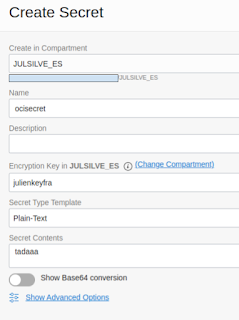 |
| Create ocisecret |
Follow the step to install with Helm https://external-secrets.io/v0.4.4/guides-getting-started/
helm repo add external-secrets https://charts.external-secrets.io
helm install external-secrets \
external-secrets/external-secrets \
-n external-secrets \
--create-namespace
External Secret offers two ways to authenticate, using Instance principal or service account authentication.
To use Instance principal, you need to create a dynamic group and IAM policy.
Create Dynamic Group
Instances that meet the criteria defined by any of these rules will be included in the dynamic group.
Dynamic group name: oke-kms-dyn-grp
Any {instance.compartment.id = 'ocid1.compartment.oc1..xxxxxx'}
Any {resource.type = 'cluster',resource.compartment.id = 'ocid1.compartment.oc1..xxxxxx'}

Use your compartment OCID.
IAM Policy
IAM policy will allow the defined dynamic group to manage secrets in your compartment.
Allow dynamic-group oke-kms-dyn-grp to manage vaults in compartment JULSILVE_ES
Allow dynamic-group oke-kms-dyn-grp to manage keys in compartment JULSILVE_ES
Allow dynamic-group oke-kms-dyn-grp to manage secret-family in compartment JULSILVE_ES

Use your compartment name.
Tips
You can SSH into your worker node to validate your instance principal configuration.
oci --auth instance_principal --region us-ashburn-1 secrets secret-bundle get --secret-id "${SECRET_OCID}"
Specify the OCID of the OCI Vault and your region.
  apiVersion: external-secrets.io/v1alpha1
  kind: SecretStore
  metadata:
    name: example-instance-principal
  spec:
    provider:
      oracle:
        vault: # The vault OCID
        region: # The vault region eq: us-ashburn-1
Create your secret store
kubectl create -f secretstore.yaml
You must create a Kubernetes secret with the API key and the related fingerprint to use the service account method.
Generate a new API Key and fingerprint from OCI Console.
Create a Kubernetes secret with the API Key (Pem certificate) and the fingerprint.
Create Kubernetes Secret
apiVersion: v1
kind: Secret
metadata:
  name: oracle-secret
  labels:
    type: oracle
type: Opaque
stringData:
  privateKey: |-
        -----BEGIN PRIVATE KEY-----
        insert you PEM certificate
        -----END PRIVATE KEY-----
  fingerprint: 00:00:00:00:00:00:00:00:00:00:00:00:00:00:00:00
apiVersion: external-secrets.io/v1alpha1
kind: SecretStore
metadata:
  name: secretstore-auth
spec:
  provider:
    oracle:
      vault: # The vault OCID
      region: # The vault region eq: us-ashburn-1
      auth:
        user: # The user OCID to use
        tenancy: # The tenancy OCID
        secretRef:
          privatekey:
            name: oracle-secret
            key: privateKey
          fingerprint:
            name: oracle-secret
            key: fingerprint
Once your Secret Store is created, you can confirm its validity.
$ kubectl get ss
NAME           AGE    STATUS
example-auth   5d5h   Valid
julienvault    13d    Valid
Then create the external secret to sync your OCI Vault secret to your Kubernetes secret using your secret store.
apiVersion: external-secrets.io/v1alpha1
kind: ExternalSecret
metadata:
  name: ocisecret
  namespace: default
spec:
  refreshInterval: 0.03m
  secretStoreRef:
    kind: SecretStore
    name: julienvault
  target:
    name: k8s-secret
    creationPolicy: Owner
  data:
    - secretKey: oci-secret
      remoteRef:
        key: ocisecret
DataFrom can be used to get a secret as a JSON string and attempt to parse it.
dataFrom:
  - key: username
Data can use used to get a string, like in my example.
As result your external secret (es) is synchronized with OCI Vault.
kubectl get es ocisecret
NAME        STORE         REFRESH INTERVAL   STATUS
ocisecret   julienvault   0.03m              SecretSynced
To confirm, you can query and decode the data content of the secret.
kubectl get secret k8s-secret -o jsonpath='{.data.oci-secret}'| base64 -d
tadaaa
